


This article may contain affiliate links. TheRoboWire may earn a commission at no extra cost to you.
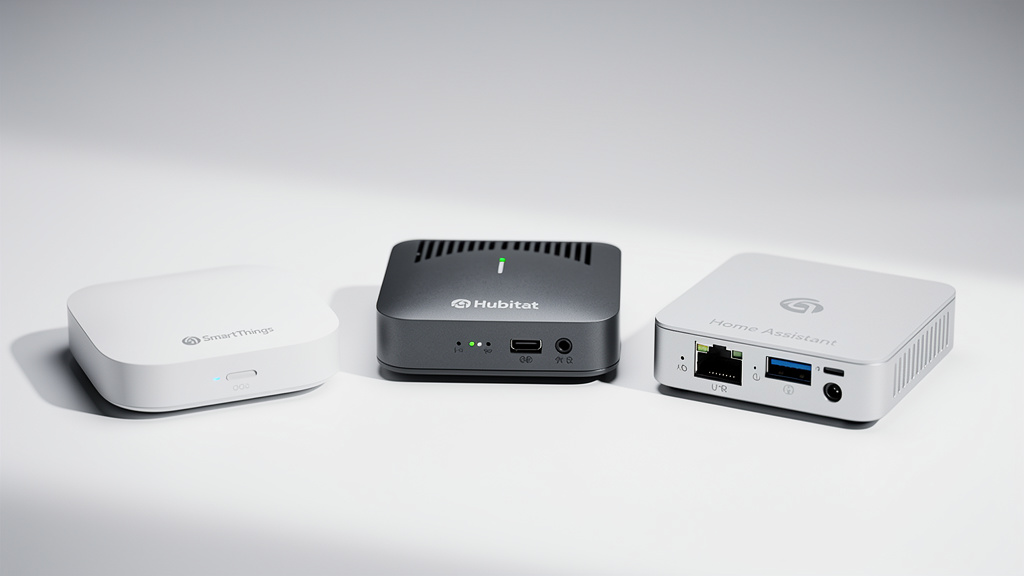
Choosing the right smart home hub is arguably the most important decision you’ll make for your connected home. Get it wrong, and you’ll spend more time troubleshooting than automating. The three most capable dedicated hubs in 2026 — Samsung SmartThings, Hubitat Elevation, and Home Assistant — each take radically different approaches to solving the same problem. After digging into specs, real-world performance, and community feedback, here’s an honest comparison to help you pick the right one.
TL;DR — Quick Verdict
- Samsung SmartThings — Best for most people who want a polished app, broad Matter support, and Samsung ecosystem integration.
- Hubitat Elevation C-8 Pro — Best for Z-Wave-heavy homes and users who want 100% local processing without the DIY learning curve of Home Assistant.
- Home Assistant — Best for power users, privacy advocates, and tinkerers who want unlimited customization and 2,500+ integrations.
What Each Hub Actually Is
Samsung SmartThings (Aeotec Smart Home Hub 2)
SmartThings is Samsung’s cloud-first smart home platform, now in its fourth-generation dedicated hub — the Aeotec Smart Home Hub 2, launched in late 2025. It’s the most consumer-friendly of the three, with a polished mobile app and the fastest Matter adoption of any major platform. Samsung was the first to support Matter 1.5, including smart camera integration, in early 2026.
The Hub 2 features a 53% faster CPU and 512 MB of RAM compared to its predecessor, supports Matter over Thread, Zigbee 3.0, and Bluetooth Low Energy. Notably, Samsung dropped Z-Wave support in this generation — a significant change for users with older Z-Wave devices. It’s priced at $120.
Hubitat Elevation C-8 Pro
Hubitat takes a fundamentally different philosophy: everything runs locally. The C-8 Pro — the current flagship model at around $175–$200 — features a 2.0 GHz processor, 2 GB of RAM, and supports Zigbee 3.0, Z-Wave 800 with Long Range, and Matter. Both Zigbee and Z-Wave use external antennas for improved range, which matters a lot in larger homes or when connecting to detached structures.
No internet required. No cloud dependency. No subscription for core features. Your automations run on the hub itself.
Home Assistant (Green / Yellow / DIY)
Home Assistant is open-source software that runs on dedicated hardware (the Home Assistant Green at $99, the Yellow at $199) or any Linux machine, Raspberry Pi, or virtual machine. It’s the most capable platform by far — with over 2,500 integrations covering virtually every smart device and service on the planet.
The trade-off is a steeper learning curve. Home Assistant doesn’t have built-in radios; you add Zigbee, Z-Wave, or Thread support via USB dongles like the ZBT-1 ($30) or ZWA-2 ($35).
Head-to-Head Comparison
| Feature | SmartThings Hub 2 | Hubitat C-8 Pro | Home Assistant Green |
|---|---|---|---|
| Price | $120 | $175–$200 | $99 (+ dongles) |
| Zigbee | Yes (3.0) | Yes (3.0, external antenna) | Via USB dongle |
| Z-Wave | ❌ Dropped in Hub 2 | Yes (800 + Long Range) | Via USB dongle |
| Matter | Yes (1.5 — first adopter) | Yes | Yes |
| Thread | Yes (Border Router) | No built-in | Via dongle |
| Local Processing | Partial | 100% | 100% |
| Cloud Required | Yes (for most features) | No | No |
| Subscription | Free (premium optional) | Free (remote access $3/mo optional) | Free (Nabu Casa $6.50/mo optional) |
| Mobile App | ★★★★★ Excellent | ★★★☆☆ Functional | ★★★★☆ Good (improving) |
| Ease of Setup | ★★★★★ | ★★★☆☆ | ★★☆☆☆ |
| Automation Power | ★★★☆☆ | ★★★★☆ | ★★★★★ |
| Integrations | Hundreds | ~1,000+ | 2,500+ |
| Voice Assistants | Alexa, Google, Bixby | Alexa, Google, Siri (HomeKit) | Alexa, Google (via Nabu Casa or manual) |
| CPU | Not disclosed (53% faster than Gen 1) | 2.0 GHz quad-core | 1.8 GHz quad-core |
| RAM | 512 MB | 2 GB | 4 GB |
Local Control vs. Cloud: Why It Actually Matters
This is the single biggest philosophical difference between these three hubs, and it affects your daily life more than any spec sheet suggests.
SmartThings processes many automations locally now (Samsung has improved this significantly), but the app, advanced routines, and most integrations still rely on Samsung’s cloud servers. When Samsung’s servers go down — and they have, multiple times — parts of your smart home stop responding.
Hubitat and Home Assistant both process everything locally. Your lights, locks, sensors, and automations keep running even if your internet drops. For many users, this alone is the deciding factor. The practical difference? Hubitat and Home Assistant automations typically respond in milliseconds. Cloud-dependent automations can take 1–3 seconds — noticeable when you’re walking through a dark room expecting a motion-triggered light.
The Z-Wave Question
Samsung’s decision to drop Z-Wave from the Hub 2 is a big deal. Z-Wave devices — smart locks from Yale and Schlage, sensors from Zooz, switches from GE/Jasco — are still widely installed in millions of homes. If you have Z-Wave devices, your options are:
- Hubitat C-8 Pro: Best Z-Wave support available. The Z-Wave 800 with Long Range (LR) theoretically reaches up to a mile line-of-sight. Real-world indoor range is still far superior to standard Z-Wave.
- Home Assistant: Excellent Z-Wave support via USB dongles (Zooz ZST39, Aeotec Z-Stick 7).
- SmartThings V3 hub: Still available but Aeotec plans to discontinue it by end of 2026.
Matter Support: SmartThings Leads
If Matter compatibility is your top priority, SmartThings wins this category convincingly. Samsung was the first platform to support Matter 1.5 — which includes smart cameras — and they’ve supported 58 Matter device types as of early 2026. They’re also partnering with Aqara, Eve, and Ulticam for the first wave of Matter-enabled cameras.
Home Assistant and Hubitat both support Matter, but SmartThings’ implementation is more mature and covers more device types. That said, Matter is still evolving rapidly, and all three platforms are actively improving their support.
Automation Depth: Where the Real Differences Show
SmartThings offers Routines — if-this-then-that style automations that cover basic to intermediate scenarios well. Samsung has added Galaxy AI-powered automations that can suggest routines based on your patterns. For most households, this is plenty.
Hubitat steps it up with Rule Machine — a powerful, if visually dated, automation engine. You can create complex conditional logic: “If motion is detected AND it’s after sunset AND the temperature difference between two rooms is more than 5 degrees, then turn on the fan and dim the bedroom lights to 30%.” It’s powerful, but the interface takes getting used to.
Home Assistant is in a different league entirely. Between its built-in automation editor, Node-RED integration, YAML scripting, and template sensors, you can automate literally anything. “Turn on the porch light when my car enters the neighborhood after sunset” — that’s a Tuesday afternoon project in Home Assistant. The 2026.2 update also introduced a redesigned dashboard that’s finally family-friendly.
The User Interface Reality Check
Let’s be honest about the elephant in the room:
- SmartThings has the best app, period. It’s clean, intuitive, and your non-technical family members can use it without a tutorial.
- Hubitat’s interface looks like it was designed in 2008 — because it kind of was. Users in the community lovingly (and accurately) compare it to Windows 3.1. It works, but “pretty” isn’t the word.
- Home Assistant has improved dramatically. The Lovelace dashboard system is highly customizable, and recent updates have made it much more approachable. But “approachable for a power user” and “approachable for your parents” are two very different things.
Pros and Cons Summary
Samsung SmartThings
Pros:
- Best mobile app and user experience
- Leading Matter support (1.5, 58 device types)
- Thread Border Router built in
- Samsung appliance integration (TVs, fridges, washers)
- Galaxy AI automation suggestions
- Affordable at $120
Cons:
- Cloud-dependent for many features
- No Z-Wave support in Hub 2
- Limited advanced automation capabilities
- Server outages affect functionality
Hubitat Elevation C-8 Pro
Pros:
- 100% local processing — works without internet
- Best Z-Wave support (800 + Long Range)
- No subscription required for core features
- Powerful Rule Machine for complex automations
- External antennas for better range
- Apple HomeKit integration
Cons:
- Dated, clunky user interface
- Steeper learning curve than SmartThings
- Smaller community than Home Assistant
- Higher price point ($175–$200)
- No built-in Thread support
Home Assistant
Pros:
- 2,500+ integrations — supports virtually everything
- 100% local processing and open-source
- Unlimited automation complexity
- Maximum privacy — data never leaves your network
- Lowest entry price ($99 for Green, free on existing hardware)
- Massive, active community
- Monthly updates with new features
Cons:
- Steepest learning curve of the three
- No built-in radios — requires USB dongles for Zigbee/Z-Wave
- Alexa/Google integration requires Nabu Casa ($6.50/mo) or manual setup
- Can require significant time investment to configure optimally
FAQ
Can I use SmartThings and Home Assistant together?
Yes. Many users run SmartThings as their Zigbee/Matter radio and bridge devices into Home Assistant for more powerful automations. Home Assistant has a native SmartThings integration that works well. Similarly, Hubitat connects to Home Assistant via the Maker API.
Which hub is best for beginners?
Samsung SmartThings, without question. The app guides you through setup, device pairing is straightforward, and you don’t need to understand protocols or YAML files. If you outgrow it, you can always add Home Assistant later and keep SmartThings as a bridge.
Do any of these hubs work without internet?
Hubitat and Home Assistant both work fully offline for local devices. SmartThings can run some local automations without internet, but many features require cloud connectivity. If reliable operation during internet outages is important to you, Hubitat or Home Assistant is the way to go.
Bottom Line: Which Smart Home Hub Should You Buy?
Choose SmartThings if you want the easiest setup, the best app, and you’re building a new smart home around Matter and Zigbee devices. It’s the most polished experience and Samsung’s investment in Matter leadership makes it a strong bet for the future.
Choose Hubitat if you have Z-Wave devices, want everything running locally, and you’re willing to deal with a less pretty interface for rock-solid reliability. It’s the sweet spot between SmartThings simplicity and Home Assistant complexity.
Choose Home Assistant if you’re a tinkerer who wants total control, maximum privacy, and the ability to automate literally anything in your home. The learning curve is real, but the community support is incredible, and once it’s set up, nothing else comes close.
For many advanced users, the real answer is: use two. Run Hubitat or SmartThings as your reliable radio hub, and pipe everything into Home Assistant for the automation engine and dashboard. It sounds complicated, but this “best of both worlds” approach is increasingly common — and it works.
Prices referenced in this article were verified as of March 2026 and may vary by retailer.
