


Quick Answer
Robot mower installation takes 2-6 hours depending on yard complexity. Key steps: plan boundary wire layout, install charging station on level ground, lay wire 15cm from edges, connect to power supply, program cutting zones via app, and test operation. Professional installation costs $200-500 but DIY saves money with proper planning. Critical factors: wire placement depth, obstacle clearance, slope considerations, and app configuration.
This article contains affiliate links. TheRoboWire may earn a commission on qualifying purchases at no extra cost to you. See our affiliate disclosure for details.
Pre-Installation Planning and Site Survey
Successful robot mower installation begins with comprehensive site analysis and planning. Professional landscapers spend 30-60 minutes surveying properties before beginning installation, identifying challenges that could affect long-term performance.
Measure your lawn area accurately using smartphone apps or traditional methods to ensure your robot mower model handles the coverage area. Most manufacturers specify maximum cutting areas under ideal conditions, but real-world performance typically achieves 80-90% of stated capacity.
Document obstacle locations including trees, flower beds, decorative elements, and irrigation components. These features require wire routing decisions that affect installation time and cutting pattern efficiency.
Evaluate terrain characteristics including slopes, drainage patterns, and soil conditions. Steep areas over 25% grade may require specialized installation techniques or model upgrades with enhanced slope capabilities.
Check utility locations before digging or staking wire placement. Contact local utility marking services to identify underground cables, gas lines, or irrigation systems that could interfere with boundary wire installation.
Tools and Materials Required
Gather all necessary tools and materials before beginning installation to ensure smooth, uninterrupted setup. Most robot mower manufacturers include basic installation kits, but additional tools improve efficiency and installation quality.
Included in Most Installation Kits:
- Boundary wire (typically 100-200 meters)
- Charging station with power supply
- Wire stakes or pegs (30-50 pieces)
- Wire connectors (weatherproof)
- Installation manual and quick start guide
- Basic measurement tape (often limited length)
Additional Tools Needed:
- Spade or edging tool for wire burial
- Wire cutters or utility knife
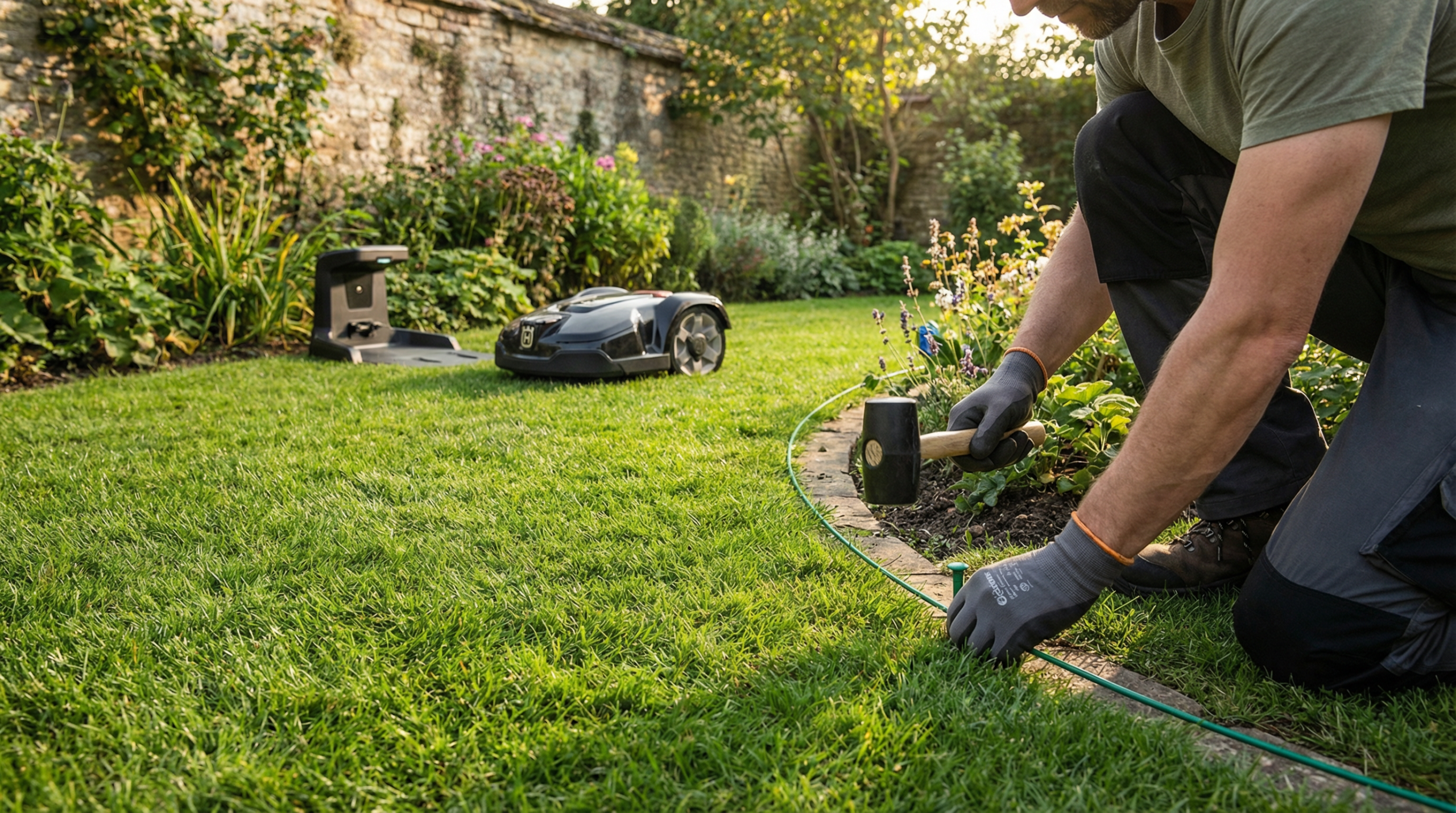
- Hammer for driving stakes
- 100-foot measuring tape
- Level for charging station placement
- Marking spray paint or flags
- Voltmeter for wire testing (optional but recommended)
Optional Upgrades:
- Extra boundary wire for complex layouts
- Additional wire stakes for secure placement
- Wire burial tool or trenching spade
- Weatherproof wire nuts for connections
- Wire marking tape for future identification
Charging Station Installation
Charging station placement significantly impacts daily operation and long-term reliability. The station serves as both power source and navigation reference point, requiring careful positioning for optimal performance.
Location Selection Criteria:
Choose level ground within 10 meters of AC power source to minimize extension cord requirements. Sloped installation causes charging contact issues and may void manufacturer warranties.
Ensure adequate clearance around the charging station: 1 meter straight ahead for robot approach, 0.5 meters on each side for maneuvering. Insufficient clearance causes docking failures and interrupts autonomous operation.
Consider seasonal sun exposure changes that might affect charging station temperatures. Direct summer sun can overheat electronics, while winter shade may delay morning startup in cold climates.
Avoid low-lying areas prone to water accumulation during heavy rain. Even weatherproof stations can experience problems with prolonged water exposure or ice formation.
Installation Steps:
Level the ground using a spirit level, removing high spots and filling depressions to create a stable foundation. Uneven surfaces cause connector misalignment and charging failures.
Position the charging station with the docking area facing the largest lawn area to facilitate robot approach angles. Most robots approach the station in straight lines, so orientation affects success rates.
Connect the power supply to household AC power using GFCI protection as required by electrical codes. Outdoor installations must use weatherproof connections and appropriate cord management.
Test charging station operation by checking indicator lights and measuring output voltage if equipped with testing capabilities. Establish baseline performance before proceeding with wire installation.
Boundary Wire Layout and Installation
Boundary wire installation represents the most time-consuming aspect of robot mower setup, typically requiring 60-80% of total installation time. Proper technique ensures reliable operation and minimizes future maintenance requirements.
Wire Routing Principles:
Maintain 15-20 cm distance from lawn edges to prevent wheel damage and ensure complete grass cutting. Closer placement risks robot wheels leaving the cutting area, while excessive distance leaves uncut strips.
Create smooth curves around obstacles rather than sharp corners that can trap robots or create navigation difficulties. Radius curves should be at least 30 cm to accommodate robot turning capabilities.
Plan wire routes to minimize crossovers and complex intersections that can confuse navigation systems. Use obstacle wires for complex areas rather than convoluted boundary wire routing.
Surface vs. Buried Installation:
Surface installation using stakes enables easy modifications and troubleshooting but increases damage risk from foot traffic and maintenance equipment. Use this method for temporary installations or when testing layouts.
Buried installation provides permanent, protected wire placement but complicates future modifications. Bury wire 1-2 cm deep using edging tools or specialized burial equipment.
Combination approaches use surface installation initially for testing, then bury wire after confirming optimal layout. This method balances flexibility with long-term protection.
Obstacle Wire Integration:
Create no-go zones around flower beds, trees, and decorative elements using obstacle wire loops. These secondary circuits use the same signal frequency but create exclusion areas.
Connect obstacle wires to boundary wire at designated connection points marked in installation instructions. Improper connections can disrupt the entire electromagnetic field.
Test obstacle wire effectiveness by running robot in manual mode to verify proper avoidance behavior. Adjust wire placement if robots consistently breach protected areas.
Wire Burial Techniques and Best Practices
Proper wire burial techniques ensure long-term reliability while protecting the installation from damage. Different soil types and conditions require adapted approaches for optimal results.
Soil Preparation:
Moisten dry soil before burial to ease digging and reduce wire stress during installation. Avoid working in saturated soil that can compact and damage root systems.
Mark wire routing with spray paint or flags before beginning burial to maintain consistent depth and alignment. Clear routing reduces installation time and improves final appearance.
Test soil depth capabilities using a probe or thin rod to identify obstacles like rocks, roots, or utility lines that might affect wire placement depth.
Burial Methods:
Use edging tools to create narrow trenches 1-2 cm deep along marked routes. Consistent depth prevents signal variations that can affect robot navigation accuracy.
Install wire in trenches using gentle curves and avoiding sharp bends that can crack wire insulation. Leave slight slack to accommodate soil movement and settling.
Backfill trenches carefully to avoid wire displacement, tamping lightly to restore original grade. Mark buried wire locations for future reference during maintenance activities.
Connection Protection:
Use waterproof wire nuts or specialized connectors for all wire joints to prevent corrosion and signal loss. Standard electrical connections will fail in outdoor environments.
Create service loops at connection points to facilitate future maintenance without disturbing buried sections. Coil excess wire neatly and protect with weatherproof covers.
Test all connections with a voltmeter or continuity tester before final backfilling. Identifying connection problems during installation prevents expensive troubleshooting later.
App Configuration and Zone Programming
Modern robot mowers rely on smartphone apps for configuration and operation control. Proper app setup ensures optimal cutting patterns and enables advanced features like scheduling and theft protection.
Initial Setup Process:
Download the manufacturer’s app and create user accounts before beginning robot configuration. Many features require cloud connectivity and user registration for full functionality.
Connect robot to home Wi-Fi networks following app instructions, ensuring signal strength is adequate throughout the cutting area. Weak Wi-Fi signals cause communication failures and limit remote functionality.
Configure basic settings including cutting height, schedule preferences, and security options. Start with manufacturer recommendations and adjust based on grass growth patterns and personal preferences.
Zone Definition and Mapping:
Define cutting zones based on grass types, usage patterns, and maintenance requirements. High-traffic areas may need more frequent cutting, while ornamental areas require different height settings.
Set up multi-zone schedules if your robot supports this feature, enabling different cutting frequencies and heights for various yard areas. Sports areas benefit from frequent cutting while naturalized areas need less attention.
Configure no-go zones for seasonal decorations, temporary landscaping projects, or weather-sensitive areas. Virtual barriers provide flexibility without physical wire modifications.
Advanced Features Setup:
Enable GPS tracking and theft protection features if available, setting up alert notifications for unauthorized movement. These features provide security and aid in recovery if theft occurs.
Configure weather integration to automatically adjust cutting schedules based on precipitation forecasts and soil conditions. This feature prevents damage and optimizes cutting quality.
Set up maintenance reminders for blade replacement, cleaning schedules, and seasonal service requirements. Proactive maintenance prevents problems and extends robot lifespan.
Testing and Fine-Tuning
Comprehensive testing ensures proper installation and identifies adjustment needs before beginning autonomous operation. Systematic testing prevents problems that might damage equipment or lawn areas.
Initial System Tests:
Test boundary wire signal strength using robot sensors or dedicated testing equipment. Signal variations indicate connection problems or interference that requires correction.
Run robot in manual mode around the entire perimeter to verify proper boundary detection and turning behavior. Address any areas where robots fail to recognize boundaries or exhibit erratic behavior.
Test charging station docking by manually initiating return sequences from various yard locations. Successful docking from all areas indicates proper station positioning and approach angles.
Cutting Pattern Evaluation:
Observe initial cutting patterns to identify areas of incomplete coverage or excessive overlap. Adjust cutting schedules or zone definitions to optimize coverage efficiency.
Monitor robot behavior around obstacles and tight spaces, adjusting obstacle wire placement if robots consistently get stuck or miss areas.
Evaluate cutting quality by examining grass appearance after initial cutting cycles. Uneven cutting indicates blade problems, height adjustment needs, or speed modifications.
Schedule Optimization:
Start with conservative cutting schedules and gradually increase frequency based on grass growth and appearance. Excessive cutting can stress grass while insufficient cutting creates appearance problems.
Monitor battery usage patterns to ensure robots complete cutting cycles without excessive drainage. Adjust schedules if robots consistently return to charging stations with very low battery levels.
Fine-tune cutting times based on noise restrictions, family schedules, and grass growth patterns. Most robots operate most efficiently during morning or evening hours when temperatures are moderate.
Common Installation Problems and Solutions
Understanding common installation issues enables quick resolution and prevents costly service calls. Most problems result from planning oversights or installation technique errors that DIY installers can address.
Boundary Wire Issues:
Wire breaks during installation typically result from excessive tension or sharp tools. Test wire continuity regularly during installation and use gentle handling techniques to prevent damage.
Signal interference from electrical equipment, irrigation systems, or metal objects can disrupt robot navigation. Route wire away from interference sources or use shielded wire in problematic areas.
Incorrect wire connections cause navigation errors or complete system failures. Follow manufacturer wiring diagrams exactly and test connections before finalizing installation.
Charging Station Problems:
Poor docking performance usually indicates charging station misalignment or inadequate approach clearance. Ensure level installation and adequate maneuvering space around the station.
Electrical connection issues cause charging failures and interruption of autonomous operation. Use GFCI protection and weatherproof connections for all outdoor electrical work.
Seasonal movement from freeze-thaw cycles can affect charging station alignment. Check station level annually and adjust as needed to maintain proper operation.
App and Connectivity Issues:
Wi-Fi connectivity problems limit remote functionality and prevent software updates. Ensure adequate signal strength throughout the cutting area or install Wi-Fi extenders as needed.
GPS reception issues in areas with heavy tree cover or tall buildings can affect navigation accuracy. Consider hybrid systems with backup navigation methods for problematic areas.
Software configuration errors cause cutting pattern problems or safety system malfunctions. Reset to factory defaults and reconfigure carefully following manufacturer instructions.
Maintenance Setup and Seasonal Considerations
Establishing maintenance routines during installation ensures long-term performance and prevents premature equipment failure. Seasonal preparation requirements vary by climate and grass type.
Regular Maintenance Schedule:
Weekly cleaning removes grass buildup and debris that can affect performance. Establish cleaning stations with water access and storage for cleaning supplies.
Monthly blade inspection and replacement maintains cutting quality and prevents motor strain. Stock replacement blades and establish blade changing procedures.
Seasonal service includes comprehensive cleaning, software updates, and mechanical inspection. Schedule professional service annually or establish DIY service routines.
Winter Storage Preparation:
Clean robots thoroughly before storage to prevent corrosion and pest problems. Remove all grass clippings and debris from cutting deck and wheel areas.
Charge batteries to 50-70% capacity for long-term storage, avoiding full charge or complete discharge that can damage lithium-ion cells.
Store robots in temperature-controlled environments between 32-70°F (0-21°C) to optimize battery life and prevent condensation problems.
Spring Startup Procedures:
Inspect boundary wire for damage from winter weather, landscaping activities, or animal interference. Test system operation before beginning cutting seasons.
Update software and reconfigure settings based on seasonal grass growth patterns and schedule changes. Many manufacturers release seasonal updates with improved algorithms.
Sharpen or replace cutting blades and perform comprehensive cleaning before beginning intensive cutting seasons. Fresh blades ensure optimal cutting quality and reduce motor strain.
FAQ
How long does robot mower installation typically take?
DIY installation takes 2-6 hours for average residential properties, depending on yard complexity and boundary wire length. Simple rectangular yards may require only 2-3 hours, while complex layouts with multiple zones can take 6+ hours. Professional installation typically takes 3-4 hours but includes testing and optimization.
Can I install boundary wire myself or do I need professionals?
Most homeowners can successfully install boundary wire following manufacturer instructions. DIY installation saves $200-500 compared to professional service. However, complex yards with multiple zones, steep terrain, or extensive obstacles benefit from professional expertise. Consider professional consultation for initial planning even if doing DIY installation.
What’s the biggest mistake people make during installation?
Poor charging station placement causes most long-term problems. Stations must be level, have adequate clearance, and be positioned for easy robot approach. Sloped or cramped installations cause docking failures and interrupt autonomous operation. Spend extra time ensuring perfect station placement.
Should I bury the boundary wire or leave it on the surface?
Surface installation enables easy modifications during testing but increases damage risk from foot traffic and maintenance equipment. Bury wire 1-2 cm deep after confirming optimal layout. Many installers use surface placement initially, then bury wire after several weeks of successful operation.
How do I know if my boundary wire is working correctly?
Most robots include boundary wire testing features in their mobile apps or diagnostic modes. Test by running the robot manually around the perimeter and observing boundary detection behavior. The robot should turn consistently when approaching the wire. Use a voltmeter to check signal strength if problems persist.
Can I modify the boundary wire layout after installation?
Surface-installed wire is easily modified for layout changes or landscaping projects. Buried wire requires excavation for major changes but splices can accommodate minor adjustments. Plan initial layout carefully to minimize future modifications. Virtual boundary systems enable instant layout changes without physical work.
